Understanding the React Folder Structure
In this tutorial, you will learn how a modern React project is organized and why this structure makes your applications easier to maintain and scale.
Why Folder Structure Matters
A good folder structure makes your project:
- Easier to understand
- Easier to maintain
- Easier to scale
When every file has a clear place, development becomes faster and less confusing.
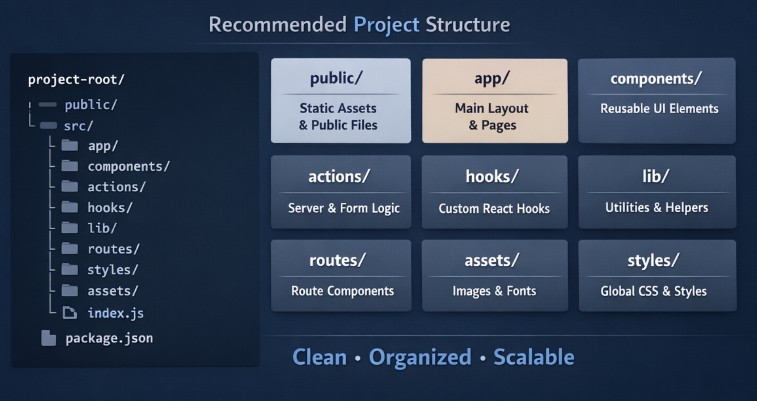
Folder Breakdown
public/
Contains static files served directly by the browser.
Examples:
- favicon.ico
- robots.txt
- static images
src/
The main application folder. All React code lives here.
src/app/
Defines the main application layout and top-level pages.
Examples:
- layout.jsx
- page.jsx
This acts as the foundation of your app.
src/components/
Reusable UI elements such as:
- Button.jsx
- Card.jsx
- InputField.jsx
These should mainly focus on presentation.
src/actions/
Contains server actions and form-related logic.
Useful when working with modern React APIs like useActionState and useFormStatus.
src/hooks/
Stores custom React hooks for reusable logic.
Examples:
- useMediaQuery
- useOnlineStatus
- useUserPreferences
src/lib/
Helper functions, utilities, and configuration files.
Examples:
- API clients
- Validators
- Formatters
src/routes/
Organizes route-specific components if you are using a router.
src/styles/
Global styles or CSS modules.
Examples:
- global.css
- theme.css
src/assets/
Images, fonts, and other static resources processed by the bundler.
Examples:
- logos
- icons
- illustrations
A clean folder structure keeps your React project predictable and scalable. By separating components, actions, hooks, routes, and utilities, you create a logical architecture that is easy to grow and maintain.